
What is React JS development?
React JS development is building user interfaces with React, an open-source JavaScript library that assembles screens from small, reusable components. Each component holds its own layout and behaviour, so a form field, a patient card or a status badge is built once and used everywhere.
We use React when a screen is busy and used for hours at a time: queues that update, forms with many conditional fields, dashboards that several roles read differently. React's component model keeps those screens consistent as the system grows, and the same team can carry the work into a mobile app with React Native.
We don't use it everywhere. A content site with a few forms is better served by a CMS or by Next.js with mostly static pages. We pick the simplest tool that will hold up, and we say so before quoting.
- Which screen does your team keep open all day?
- How many clicks does the most common task take?
- Where do staff keep a side register because the screen doesn't fit?
How a React build runs
The new screens run alongside the old way until your staff trust them.
1. Bottleneck review
We sit with the people who use the screens, map the steps they own and find where time is lost.
2. Plan
Screens, components, priorities, timeline and cost, agreed and approved by you before the build starts.
3. Build in short cycles
Working screens every cycle, starting with the one that hurts most, tested on the devices your staff actually use.
4. Run in parallel
Staff use the new screens alongside the current way of working until the numbers match and they are confident.
5. Go live and train
Each role is trained on the steps it owns. The component library and code are documented for your team.
6. Support and improve
A named support contact, monitoring and the next round of improvements based on how the screens are used.

Why React projects go wrong
React itself is rarely the problem. The trouble starts when screens are designed before anyone maps the work behind them.
Screens before process
Mock-ups are approved before anyone asks who owns each step, so the app shows data but doesn't move work forward.
No component system
Every page is built from scratch, so buttons, tables and forms drift apart and each change has to be made five times.
State everywhere
Data is fetched and stored in random places, so two screens show different answers to the same question.
Forms that fight staff
Long forms with no validation, no saved drafts and no keyboard flow. People fall back to paper.
Slow on real devices
Fine on a developer's laptop, sluggish on the front desk PC or a ward tablet on hospital Wi-Fi.
Accessibility left out
Poor contrast, missing labels and mouse-only controls shut out some users and slow down everyone else.
What we build with React
Each interface is built around the steps a role owns, with the reporting it needs designed in from the start.
- 01

Operations dashboards
Live views of queues, occupancy, pending tasks and revenue, so managers can see what is waiting without asking.
- 02

Front desk and ward screens
Registration, check-in, queues, care tasks and hand-overs, laid out for speed and keyboard use.
- 03

Customer-facing web apps
Portals for booking, payments, documents and status updates that customers can use without a phone call.
- 04

Component systems
A shared library of tested components and design tokens, so new screens are assembled rather than rebuilt.
- 05

Complex forms and workflows
Multi-step forms with validation, saved drafts, conditional fields and clear error messages, built with React Hook Form and Zod.
- 06

React Native mobile apps
iOS and Android apps for field staff, patients or customers, sharing logic and types with the web app.
Where React fits, and where we'd choose something else
React is a strong choice for interactive, long-lived interfaces. It is not the answer to every web project.
| Situation | Our usual choice | Why |
|---|---|---|
| Staff screens used for hours every day | React | Fast updates, reusable components and predictable state across many screens |
| Customer portal that also needs search visibility | React with Next.js | Server rendering for public pages, React for the logged-in app |
| Mobile app for field staff or patients | React Native | One team, shared logic and types with the web app |
| Marketing or catalogue site edited by non-developers | A CMS, often with Next.js | Editors change content without a developer; React adds little on its own |
| A simple internal form or a one-off tool | A low-code tool or a plain server-rendered page | Cheaper to build and maintain when there is little interaction |
Ways to work with us
Pick the model that matches where your React project is today.
| Model | Best when | How it is priced |
|---|---|---|
| Bottleneck review | An existing React app is slow, fragile or hard to change | Fixed fee for a short, defined engagement |
| Defined build | The screens and workflows are agreed and you want them built | Fixed scope, paid against agreed milestones |
| Managed team | You need a React team for a set project and period | Monthly, based on the team composition you need |
We quote after the first conversation, once we know the scope. Every system is handed over with documentation and a named support contact.
Our React toolkit
Chosen per project. We prefer well-supported libraries your own team can maintain after hand-over.
Core
- React
- TypeScript
- Vite
- Next.js
- React Native
- Expo
State and data
- Redux Toolkit
- RTK Query
- TanStack Query
- Zustand
Forms and UI
- React Hook Form
- Zod
- Tailwind CSS
- Radix UI
- shadcn/ui
- Recharts
Testing
- Vitest
- Jest
- React Testing Library
- Playwright
- Storybook
Delivery
- GitHub Actions
- Vercel
- AWS
- Sentry
A 50+ module hospital system, built with React
A psychiatric and mental healthcare practice moved from a manual, offline system to a digitised workflow, built with React, Node.js and PostgreSQL in three months.
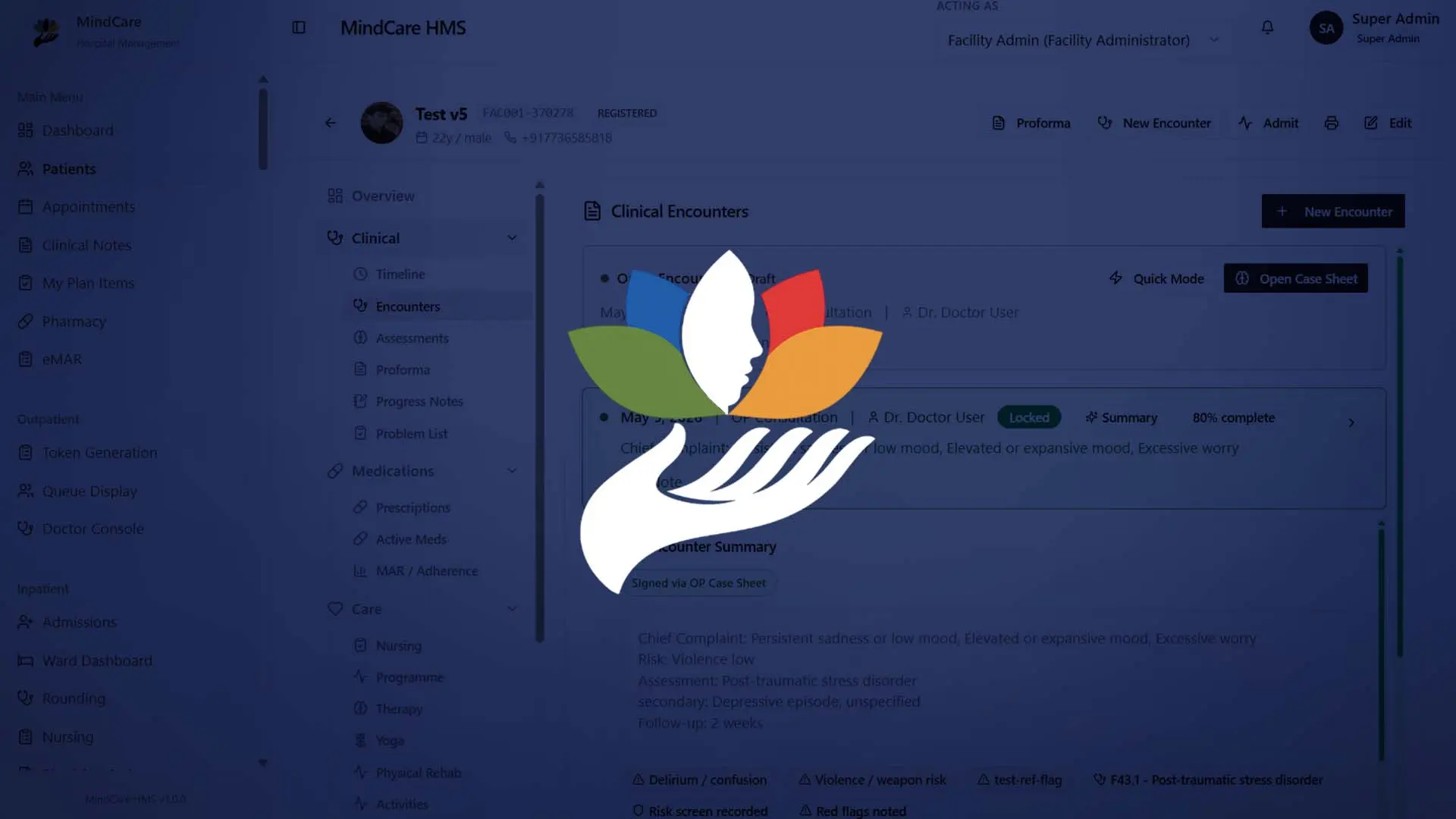
Hospital OS: Patient Records & OPD
One patient identity, one record and one outpatient flow, from the front desk to the consultation room.
- 1
- Shared patient record across departments
- 50+
- Modules in the full system
- 100%
- Workflow digitised
Where to go next
Frontend Development
Frontend development in React, Next.js and TypeScript for screens staff use all day: quick, clear, accessible and responsive, built on a design system you own.
Learn moreNext JS
Next.js development for fast, search-friendly websites and web apps: server rendering, static pages, App Router, Auth.js or Clerk, deployed on Vercel or your cloud.
Learn moreWeb Application Development
Web application development for growing businesses: one system for orders, tasks, approvals and reporting, with an owner for every step instead of spreadsheets.
Learn more
Frequently asked questions
Yes, when staff spend a lot of time in the screens and the data changes often. For a few simple forms, a lighter option is usually cheaper.
Yes. We start with a bottleneck review of the code and the way it is used, then fix the worst problems before adding features.
Where it helps. Redux Toolkit suits apps with a lot of shared state across screens. Smaller apps often only need TanStack Query and local state.
Yes, with React Native. It shares types, validation and business logic with the web app, so one team can maintain both.
Semantic markup, proper labels, keyboard navigation, visible focus and sufficient contrast, checked with automated tools and by hand.
That is the aim. We use mainstream libraries and TypeScript, document the component system and hand over with a named support contact.
Yes. We usually pair React with a Node.js and PostgreSQL backend, and can work with an existing API if you have one.
Bring us your bottleneck.
If a process in your organisation depends on one person remembering to follow up, describe it to us. You will get a straight answer on whether it needs automation, software, a team, or none of these.
Or write directly to support@algonsolutions.com